Explore History in the Real World

Bring Digitized Archival Materials into Your Physical Space
Booksnake is a new tool for close looking. It lets you bring digitized cultural heritage materials out of online archives and into the real world by using the power of augmented reality technology. Explore books, manuscripts, newspapers, maps, and more. Booksnake makes it feel like the item is there with you.
Just aim your iPhone or iPad at a flat surface, tap the screen to place your item, and move around to explore. Get in close to see fine details. Step back for an overview. Or walk around to see your item from all sides. As you move, Booksnake keeps the virtual item pinned in place—exactly where you want it.
Get Booksnake on the App Store
Booksnake is available for iPhone and iPad. Booksnake requires iOS 17 or higher. See if Booksnake will work with your device.

View in Your Space. Aim. Tap. Explore.
Booksnake makes it feel like digitized items are physically present in your real-world surroundings. Explore an archival map on your office wall. Browse a historical newspaper on your kitchen counter. Read through a medieval manuscript on a picnic table.
Booksnake works by dynamically inserting a digitized item into the live camera view on your iPhone or iPad. Tap “View in Your Space” to open the camera view. Aim your iPhone or iPad at a flat surface nearby. Tap the screen to place your item on the physical surface. Explore by moving around—just like you would in a museum or library.

3.6 Million Items. And Counting.
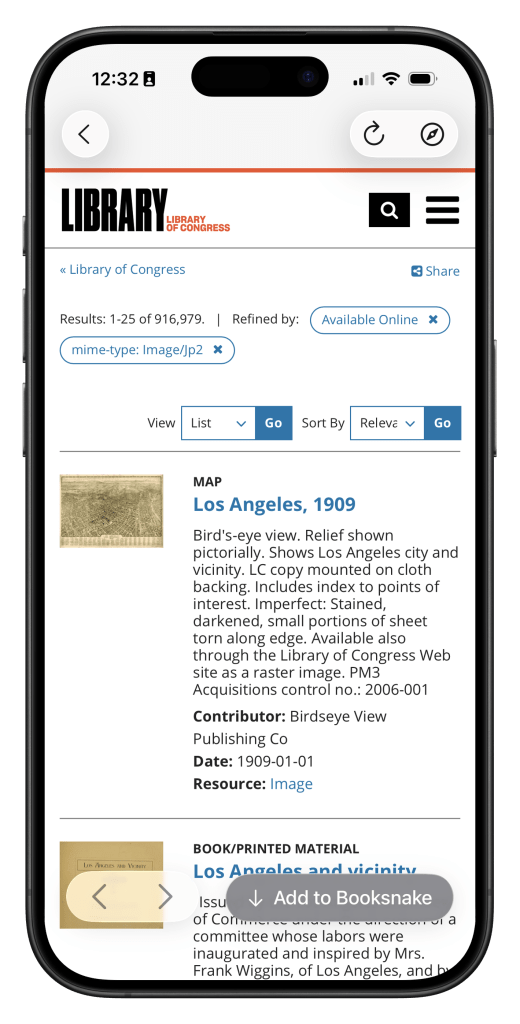
Booksnake offers access to more than 3.6 million digitized items held by the Library of Congress, with support for more archives on the way. Booksnake makes it easy to find and add your favorite sources. Search online catalogs, filter results, and examine items from right within Booksnake, just like you do in a Web browser. When you find an item you want to add to your library, tap Add to Booksnake, and Booksnake does the rest.
Booksnake connects the powerful augmented reality technology built into every recent iPhone and iPad with the International Image Interoperability Framework (IIIF), an open framework used by dozens of leading galleries, libraries, archives, and museums around the world to share archival materials. Booksnake uses IIIF to download an item’s image and metadata, then creates a custom, life-size virtual object for you to explore in the real world.
Learn more about bringing your institution’s collections into Booksnake.
Create and Share Lists of Your Favorite Items
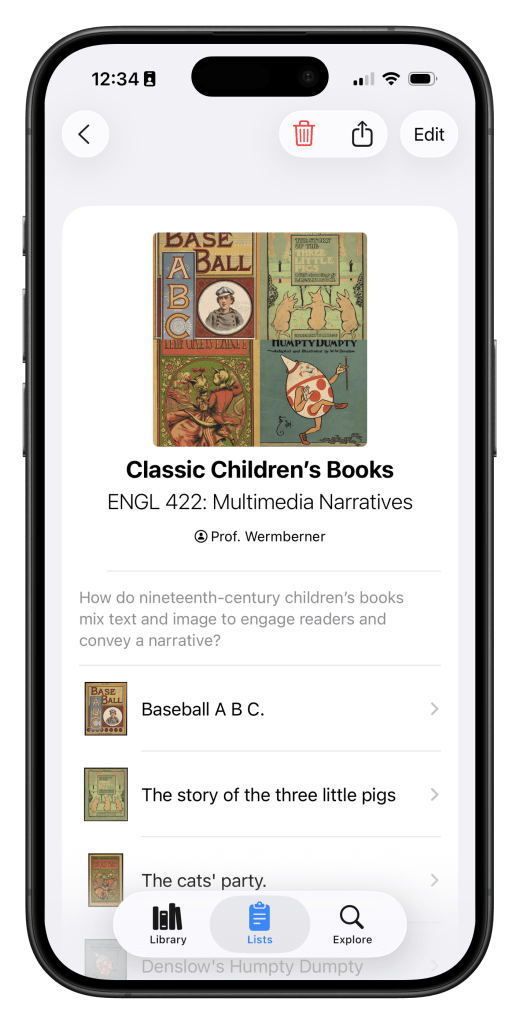
Curate a selection of materials for an essay, class, or exhibit. With Booksnake, you can collect items from multiple different archives into Lists. Add context to your Lists with a title and description. Then share your List with students, colleagues, or collaborators.
Use a Booksnake List to put students in touch with primary sources. Give museum visitors a closer view of exhibition materials. Or offer your readers, listeners, or viewers a personal encounter with your research treasures.
Build Your Personal Research Library
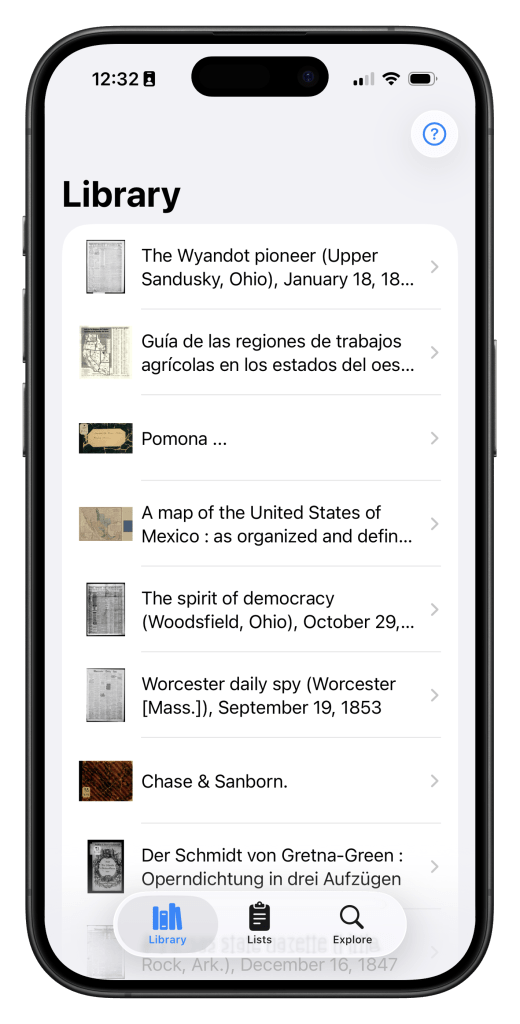
Use Booksnake to collect primary sources and take your personal research library anywhere. Each item comes with its catalog record, so you’ll always have important details like author, date created, and place of publication close at hand.
Get Ready to Turn the Page
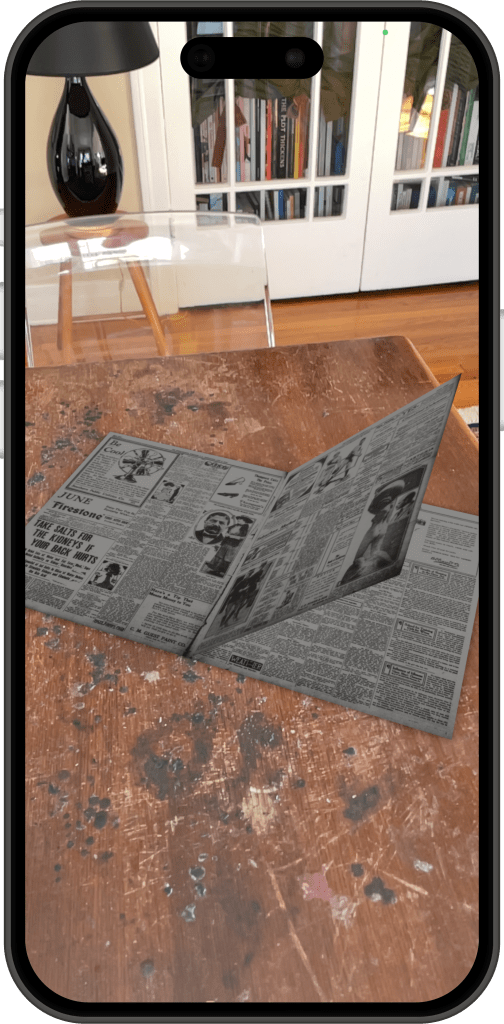
Booksnake lets you open up historical books, newspapers, magazines, and other paginated materials, then turn their pages to easily explore. To do this, Booksnake downloads images of each page, then assembles the images into a custom virtual object.
Spread out a historical newspaper. Turn the leaves of an illuminated manuscript. Examine entries in a ledger, page by page by page. Booksnake makes interacting with paginated materials fluid and intuitive.

A Document Camera.
For Virtual Documents.
Show your audience what you see with Booksnake. Use AirPlay to mirror your iPhone or iPad to a nearby TV or projector. Share your iPhone or iPad screen during a video call. Use screenshots or screen recordings to save what you see and share it later.
Booksnake makes it easy to present your favorite sources. Guide students through a birds-eye-view map. Bring an archival manuscript into a conference presentation. Lead a tour of historical photographs. Or share what you see with Booksnake on social media.
Learn More About Booksnake
Booksnake is a digital humanities experiment in how immersive technologies can enrich humanities research, teaching, and learning. Want to stay in the loop about Booksnake? Join our email list or follow us on social media and we’ll keep you updated.
FAQs
How can I get Booksnake?
Booksnake is available on the App Store as a free app for iPhone and iPad.
Are you interested in offering Booksnake on your institution’s managed devices? Let’s talk!
Will my device work with Booksnake?
Booksnake works with most iPhones and iPads produced within the last five years, and works best on Pro-level devices. Booksnake requires iOS 17 or later and is available for the following devices:
- iPhone
- iPhone 17, iPhone Air, iPhone 17 Pro, and iPhone 17 Pro Max
- iPhone 16, iPhone 16e, iPhone 16 Plus, iPhone 16 Pro, and iPhone 16 Pro Max
- iPhone 15, iPhone 15 Plus, iPhone 15 Pro, and iPhone 15 Pro Max
- iPhone 14, iPhone 14 Plus, iPhone 14 Pro, and iPhone 14 Pro Max
- iPhone 13, iPhone 13 mini, iPhone 13 Pro, and iPhone 13 Pro Max
- iPhone 12, iPhone 12 mini, iPhone 12 Pro, and iPhone 12 Pro Max
- iPhone 11, iPhone 11 Pro, and iPhone 11 Pro Max
- iPhone XS and iPhone XS Max
- iPhone XR
- iPhone SE (second generation, 2020) and later
- iPad
- iPad Pro 12.9-inch (second generation, 2017) and later
- iPad Pro 10.5-inch
- iPad Pro 11-inch (first generation, 2018) and later
- iPad Air (third generation, 2019) and later
- iPad (sixth generation, 2018) and later
- iPad Mini (fifth generation, 2019) and later
Booksnake is not available for iPod Touch.
Is Booksnake available for Android devices?
Not yet. We’re currently researching how to develop an Android version of Booksnake. Are you interested in collaborating? Let’s talk!
Can I use Booksnake on my Mac or PC?
Booksnake is only available for mobile devices. Booksnake uses the rear cameras on phones and tablets to blend digitized items into the real world.
Will my institution’s collections work with Booksnake?
Booksnake is designed to work with existing digitized collections that are accessible through the International Image Interoperability Framework (IIIF). Learn more about whether your collection’s are compatible with Booksnake.
Can I add my own images to Booksnake?
Booksnake is a viewer for existing digitized materials in online collections, so it’s not currently possible to add your own images to Booksnake.
Why is it called Booksnake?
The project is named after book snakes, the weighted strings that archival researchers use to hold fragile material in place—for example, to keep a book open or a pamphlet unfolded. Just like book snakes keep physical items in place, Booksnake keeps digitized items in place.
Meet the People Behind Booksnake
Booksnake is designed and built by a multidisciplinary team at the University of Southern California.
The Booksnake project team consists of:
- Sean Fraga, Ph.D., creator and project director. Assistant Professor (teaching) of Environmental Studies and History, USC Dornsife College of Letters, Arts, and Sciences.
- Minyu Huang, BS candidate, Computer Science and Business Administration, USC.
- Ethan Chiu, BS candidate, Computer Science, USC Viterbi School of Engineering.
- Erik Loyer, artist, creative technologist, and software developer.
- Mats Borges, project advisor. Project manager, Ahmanson Lab, USC Libraries.
- Curtis Fletcher, Ph.D., project advisor. Director, Ahmanson Lab, USC Libraries.
- Peter Mancall, Ph.D., senior project advisor. Andrew W. Mellon Professor of the Humanities, Distinguished Professor of History, Anthropology, and Economics in USC Dornsife, and the Linda and Harlan Martens Director of the USC–Huntington Early Modern Studies Institute (EMSI).
Our project alumni include:
- Christy Ye, MFA ’23, Interactive Media & Games, USC School of Cinematic Arts.
- Now: XR Development Support Engineer at Sony.
- Shih-Hsuan (Henry) Huang, MS ’23, Computer Science, USC Viterbi School of Engineering.
- Now: Software Engineer at Apple.
- Zack Sai, BS ’24, Computer Science, USC Viterbi School of Engineering.
- Now: AWS Enterprise Account Engineer at Amazon.
- Samir Ghosh.
- Now: Ph.D. candidate in Computational Media at UC Santa Cruz.
- Michael Hughes, BS ’25 Computer Science, USC Viterbi School of Engineering.
- Now: Software Engineer at Snap, Inc.
- Siyu (April) Yao, MS ’25, Computer Science, USC Viterbi School of Engineering.
- Now: Software Engineer at Temco Logistics, a Home Depot company.
- Yating Li, MS ’25, Computer Science, USC Viterbi School of Engineering.
- Ben Crotty, BS ’25, Computer Science, USC Viterbi School of Engineering.
- Now: Software Engineer at Palantir.
- Dhruv Kaul, BS ’25, Computer Science, USC Viterbi School of Engineering.
- Now: MS student, Computer Science, USC Viterbi School of Engineering.
The Booksnake advisory board includes:
- Rebecca Corbett, Ph.D., Associate University Librarian and Director of Special Projects for the Specialized Collections portfolio, USC Libraries
- Philip J. Ethington, Ph.D., Professor of History, Political Science, and Spatial Sciences, USC Dornsife
- Tom Scheinfeldt, Ph.D., Associate Professor of Digital Humanities and Director of Greenhouse Studios, University of Connecticut
- Louise Smith, MMLIS, Digital Library Project Manager, USC Libraries.
Our technical partners include:
- Mario Einaudi, MLIS, Head, Digital Collections and Imaging Services, Library Division, The Huntington Library, Art Museum, and Botanical Gardens.
- Deborah Holmes-Wong, MLIS, Director, USC Digital Library.
- William Kellum, Deputy Director of Information Technology Design and Development, Library of Congress.
- Drake Zabriskie, Chief Executive Officer, Luna Imaging, Inc.
Our educator partners include:
- Daniela Bleichmar, Ph.D., Professor of History and Art History, University of Southern California
- Eric J. Heller, Ph.D., Lecturer of Anthropology, University of Southern California
- Julia Lewandoski, Ph.D., Assistant Professor of History, University of California, San Diego.
- Lindsay O’Neill, Ph.D., Associate Professor (teaching) of History, University of Southern California.
- Meredith Drake Reitan, Ph.D., Associate Dean, Graduate School, University of Southern California; Adjunct Associate Professor, USC Price School of Public Policy and USC School of Architecture
- Kim Tulipana, Associate Director of Public, School, and Digital Programs, The Huntington Library, Art Museum, and Botanical Gardens.
From its inception, the Booksnake project has been supported by the USC–Mellon Humanities in a Digital World program in USC Dornsife and by the Ahmanson Lab, a part of the USC Sidney Harman Academy for Polymathic Study in USC Libraries.
Booksnake is supported by the National Endowment for the Humanities under the Digital Humanities Advancement Grant program. Special thanks to Jennifer Serventi, Elizabeth Tran, and Brett Bobley.
- HAA-287859-22, “Booksnake: Building and Testing an Augmented Reality Tool for Embodied Interaction with Existing Digitized Archival Materials,” Level II, 2022–24.
- HAA-304169-25, “Booksnake: Development and Dissemination of a Scholarly App for Comparing Digitized Archival Materials in Physical Space using Augmented Reality,” Level II, 2025–27.


 Booksnake